Global Translations
Global translations allow you to enable automatic translation for the entire server or large groups of channels at once. This is the most powerful way to make your community accessible to everyone.
🎯 What are Global Translations?
Unlike channel-specific translation, Global Translations apply to either the whole server or multiple categories, allowing for a more unified communication experience.
Key Benefits:
- Instant Scaling - Enable translation for all channels with one command
- Inherited Settings - New channels automatically get translation settings
- Unified Management - Manage all server translations from a single interface
- Resource Efficient - Optimized for large servers with many active members
🚀 Setting Up Global Translation
Step 1: Open Server Configuration
Use the
/server command to access the global translation settings:Terminal
/server
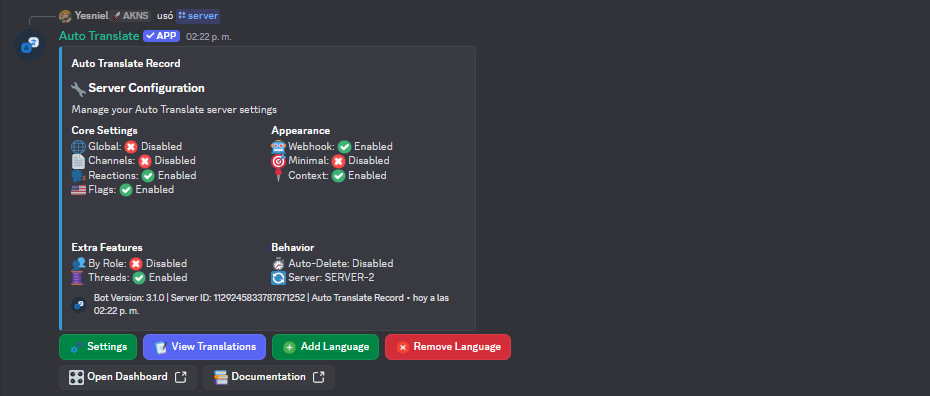
Step 2: Configure Translation Strategy
Watch how to set up server-wide translation:
Demo Live
Step 3: Choose Your Mode
Global translation offers two main modes of operation:
1. "Translate Everyone" Mode
In this mode, every message sent by any user in any channel will be automatically translated to the server's target languages.
- Best for: Small to medium community servers, announcement-heavy servers.
- Setup:
/server mode everyone
2. "Opt-in" Mode
Only messages from users who have specifically enabled translation for themselves will be translated.
- Best for: Large servers, professional environments, or servers with many bilingual members who don't always need translation.
- Setup:
/server mode opt-in
Pro Tip: Most large communities prefer Opt-in mode to reduce message
clutter while still providing accessibility for those who need it.
💡 Best Practices
- Test in a Private Channel - Before enabling server-wide mode, test your settings in a staff channel.
- Clear Policy - Announce the new translation feature to your members so they know how it works.
🔧 Management Commands
| Command | Description |
|---|---|
/server | Open Dashboard Panel |
🔍 Troubleshooting
Messages are doubled?
- You might have both a
/channeland/servertranslation active. Disable the channel-specific one if it's redundant.
Bot is hitting rate limits?
- For very large servers, consider using By Role translation to focus on specific user groups.
Ready to go? Start with
/server and follow the interactive setup!