Auto Channels
Set up automatic translation for specific Discord channels, ensuring every message is instantly translated for all members regardless of their language.
🎯 Overview
Channel-based auto-translation is perfect for:
- International communities with members from different countries
- Multilingual support channels where staff and users speak different languages
- Global announcement channels that need to reach everyone
- Collaboration spaces for international teams
🚀 Quick Setup
Getting started with auto-channels is simple and takes less than a minute.
1
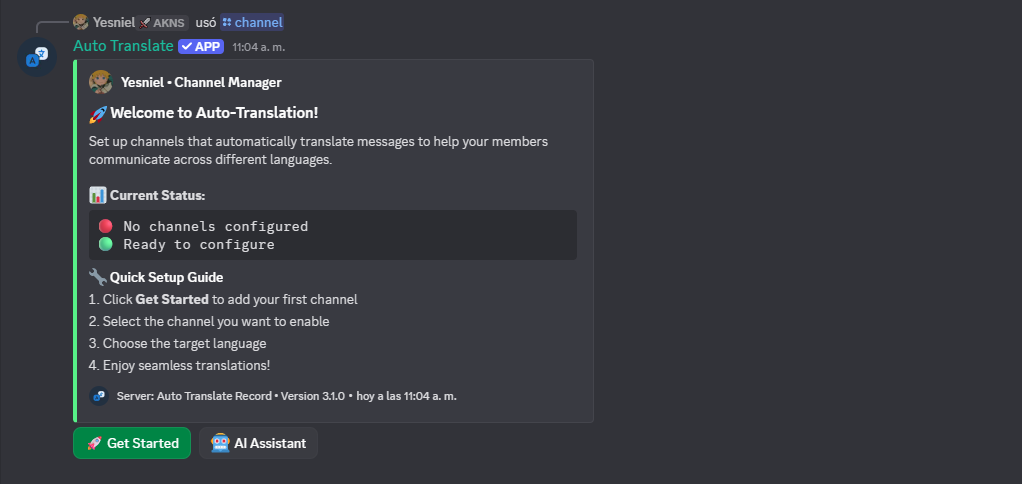
Run the Channel Command
Use the
/channel command to begin the configuration process:Terminal
/channel
This will display helpful information about the channel configuration options.
2
Follow the Interactive Setup
Watch this quick video guide to see the complete setup process:
Demo Live
3
Complete the Configuration
The bot will guide you through an easy interactive setup. Simply follow the on-screen instructions to:
- Select the channel you want to configure
- Choose source and target languages for translation
- Confirm your settings and activate auto-translation
That's it! The bot will now automatically translate all messages in the
configured channel. No additional setup required.
⚙️ Configuration Options
Single Language Pair
Translate from one language to another:
- Source: English
- Target: Spanish
- Result: All English messages are translated to Spanish
Multiple Target Languages
Translate to multiple languages simultaneously:
- Source: English
- Targets: Spanish, French, German
- Result: Messages appear in all configured languages
Bidirectional Translation
Enable two-way translation for better communication:
- Languages: English ↔ Spanish
- Result: English messages → Spanish, Spanish messages → English
💡 Best Practices
Best Practices
Recommended: Start with high-traffic channels like announcements or
general chat to maximize the impact of auto-translation.
Consider enabling auto-translation for:
- Announcement channels - Ensure important updates reach everyone
- Support channels - Help users in their native language
- General chat - Foster inclusive conversations
- Bot command channels - Usually not needed
- Media-only channels - Translation won't apply to images/videos
🔧 Managing Channel Translations
Updating Configuration
To modify an existing channel configuration:
- Run
/channelagain in the configured channel - Select "Update Configuration"
- Adjust your language settings
Disabling Translation
To turn off auto-translation for a channel:
- Run
/channelin the configured channel - Select "Disable Translation"
- Confirm the action
🔍 Troubleshooting
Messages not being translated?
- Verify the bot has
Read MessagesandSend Messagespermissions - Check that the channel is properly configured with
/channel - Ensure the source language matches the message language
Translation is slow?
- This is normal during high traffic periods
- Consider using role-based translation for better performance
- Contact support if delays persist
Learn More: Explore Global
Translations for server-wide
configuration options.